
Introduction
Guard is a moderation bot that stops scams, raids and nukes before your members see them.
Guard protects Discord communities with layers that work together: a rules-based AutoMod, honeypots that catch hacked accounts on their first message, anti-raid, verification, anti-nuke with restores, and screening for ban evasion and impersonation. On top of that come the tools your staff use every day: cases, reports, appeals, a watchlist, ban sync, mass actions and audit logs.
Everything is configured inside Discord, from one panel: /settings.
Add Guard to your server
Invite the bot, give it the right role position and run Quick Setup.
Protection
AutoMod, the honeypot, anti-raid, verification and anti-nuke.
Moderation
Cases, staff levels, reports, appeals and accountability.
Commands
Every slash command and context menu, with its options.
Logging
Audit logs, invite tracking and the weekly digest.
Server
Score your server, and back up or restore every setting.
Troubleshooting
Quick answers when Guard didn't do what you expected.
How Guard thinks about safety
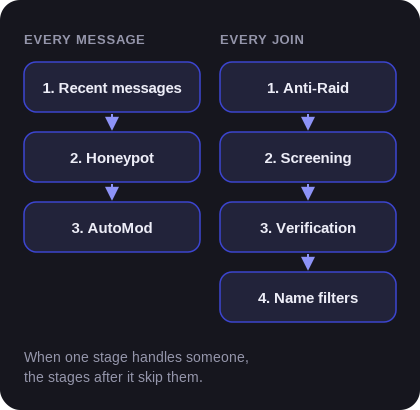
- One pipeline, never punished twice. Every message goes through the same ordered stages: recent messages, then the honeypot, then AutoMod. Every join goes through anti-raid, then screening, then verification, then name filters. When one stage handles someone, the later stages skip them.
- Fail closed. Members waiting for verification are tracked in the database, so a restart or a missed event never lets them through. Raids, temporary bans and slowmodes end through durable jobs, even after downtime.
- Nothing that can freeze the bot. Regex patterns run on RE2, and every list has limits that keep each message cheap to check.
- Owner-only where it matters. Anti-nuke settings can be seen by admins but changed only by the server owner, and they're never part of a backup, so a hacked admin can't turn them off first.
- Guard says what it can't do. Each settings page lists what the feature can't do with Guard's current permissions and role position.